Table of contents
Latest News
5
Min. reading time

Update: Shift management in Payyap – more clarity and control for your restaurant
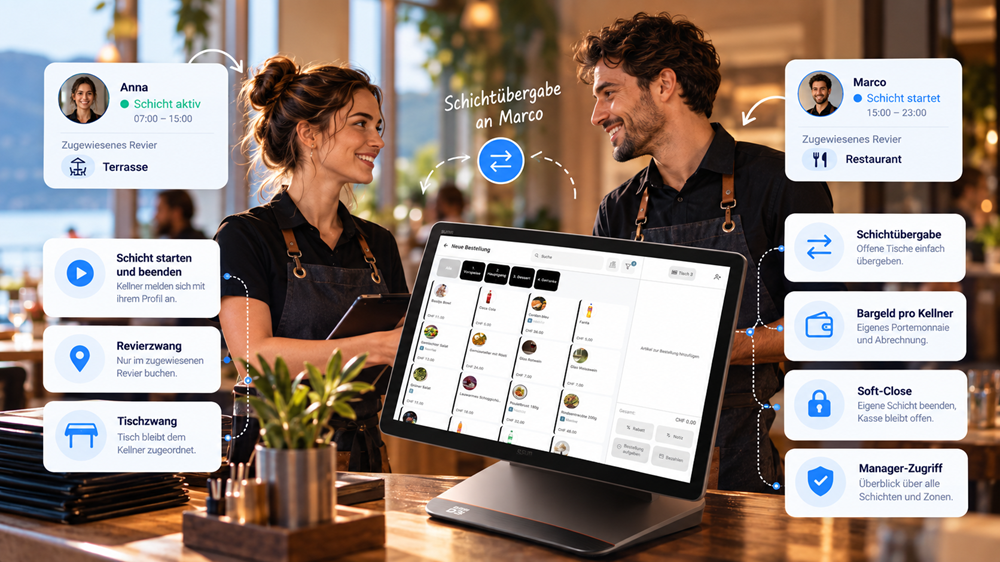
The new shift management feature from Payyap makes shift changes in your restaurant even easier. Manage shifts, service areas, and tables, hand over open orders, and keep a clear overview as a manager at all times.

Update: Shift management in Payyap – more clarity and control for your restaurant

Starting shifts, taking over tables, and balancing cash accurately: the new shift management feature makes daily operations even easier for waiters and managers.

In the hospitality industry, staff regularly rotate shifts. One waiter starts at lunch, another takes over in the evening. In between, tables are handed over, guests might move from the terrace to the restaurant, and orders and payments continue to flow simultaneously.

With the new shift management in Payyap these processes can now be mapped even more clearly. Waiters can start and end their own shifts, hand over tables and orders, and—depending on the establishment's settings—be restricted to specific sections or tables.

This keeps waiters, tables, revenue, and cash neatly accounted for, while the till itself can remain open.

Software Update

Was ist neu?

Die neue Schichtverwaltung verbindet klare Zuständigkeiten mit mehr Flexibilität im Service.

Schicht starten

Persönlich anmelden & loslegen.

Revierzwang

Terrasse, Stübli, Restaurant oder Bar.

Tischzwang

Ein Tisch. Ein zuständiger Kellner.

Schichtübergabe

Tische & Bestellungen einfach übergeben.

Bargeld pro Kellner

Eigenes Portemonnaie. Eigene Abrechnung.

Soft-Close

Schicht beenden – Kasse bleibt offen.

Manager-Zugriff

Alle Bereiche im Blick – unabhängig von Revier- und Tischzwang.

‍

Shift changes made simple

A typical evening in a restaurant: a waiter’s shift is ending, but guests are still seated at their tables.

With Payyap, that’s no problem.

The waiter can end their shift and hand over open tables and orders to another waiter. The new waiter can continue working immediately without having to re-enter any orders. The handover can also be made to a waiter who already has an active shift.

This is particularly practical for:

  • Shift changes at lunch or in the evening
  • Split shifts
  • Spontaneous staff changes
  • Long tables with multiple waiters
  • Moving from terrace to indoor area
  • Handing over an active service to another waiter

Service continues seamlessly – there is no need to restart the POS system.

Table assignment: Each waiter has their own tables

With table assignment enabled, a newly opened table is assigned to the waiter who opened it.

This means: Only that waiter can add items to the table or process the payment – until the table is actively handed over to another waiter during a shift change.

This can be particularly helpful in larger restaurants where multiple waiters are working at the same time.

Example:
Waitress Anna opens table 12 and takes the order. During her shift, table 12 remains assigned to her profile. No other waiter can accidentally take an order for this table or process its payment.

When Anna finishes her shift, she can hand over table 12 to her colleague.
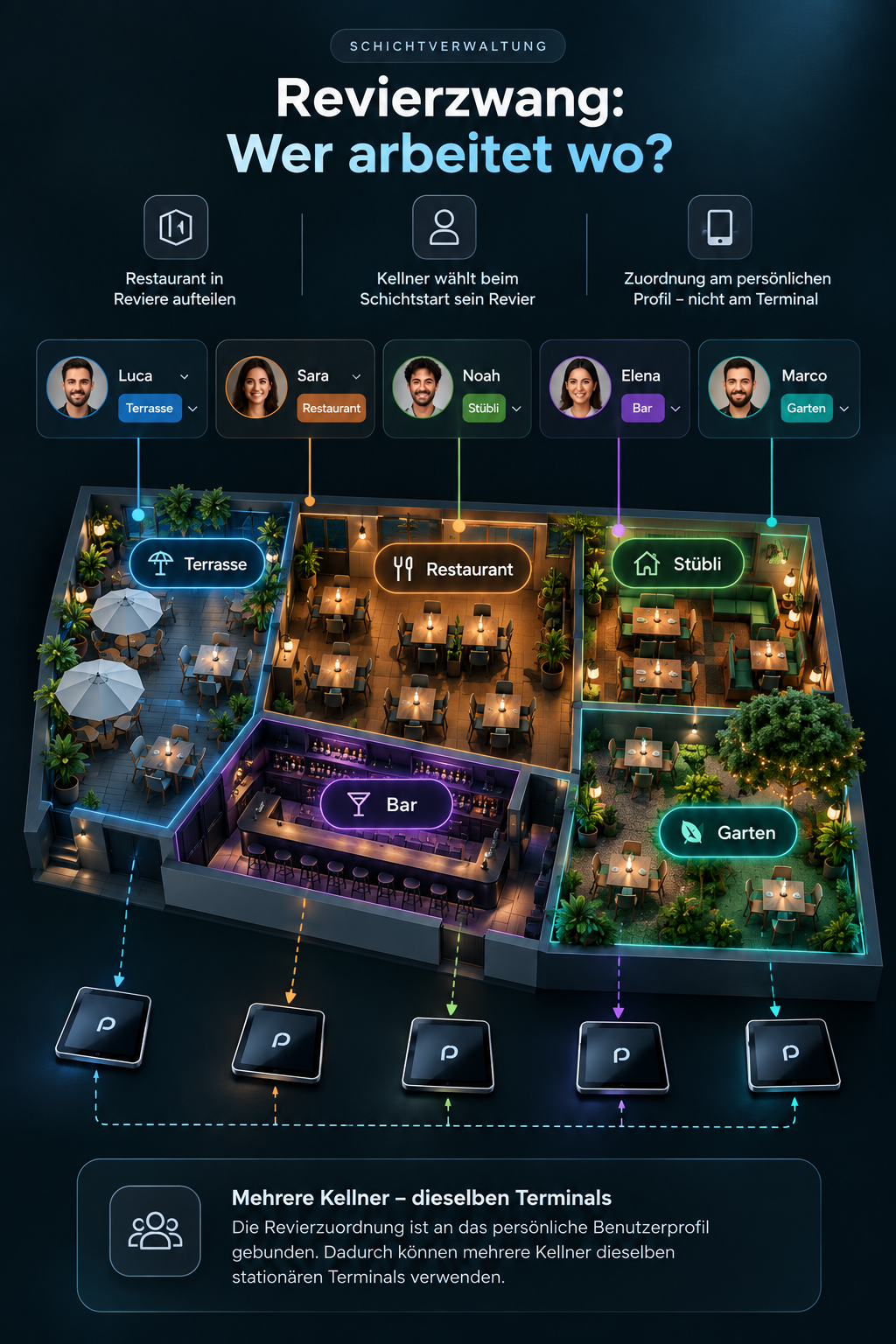
Combining section assignment and table assignment

Both functions can be activated independently of each other.

Schichtverwaltung

Revier- & Tischzuordnung

Du entscheidest, wie strikt dein Team bei Revieren und Tischen arbeitet.

Aktiv
Deaktiviert
Revierzwang Tischzwang So funktioniert es
AUS
AUS
Alles offen Alle Kellner können auf allen offenen Bestellungen arbeiten.
EIN
AUS
Nur im Revier Kellner bearbeiten nur Bestellungen in ihrem zugewiesenen Revier.
AUS
EIN
Eigene Tische Keine Revierbeschränkung. Der eröffnete Tisch bleibt dem Kellner zugeordnet.
EIN
EIN
Revier + Tisch Kellner arbeiten nur in ihrem Revier und bedienen dort ihre eigenen Tische.

‍

The manager stays in control

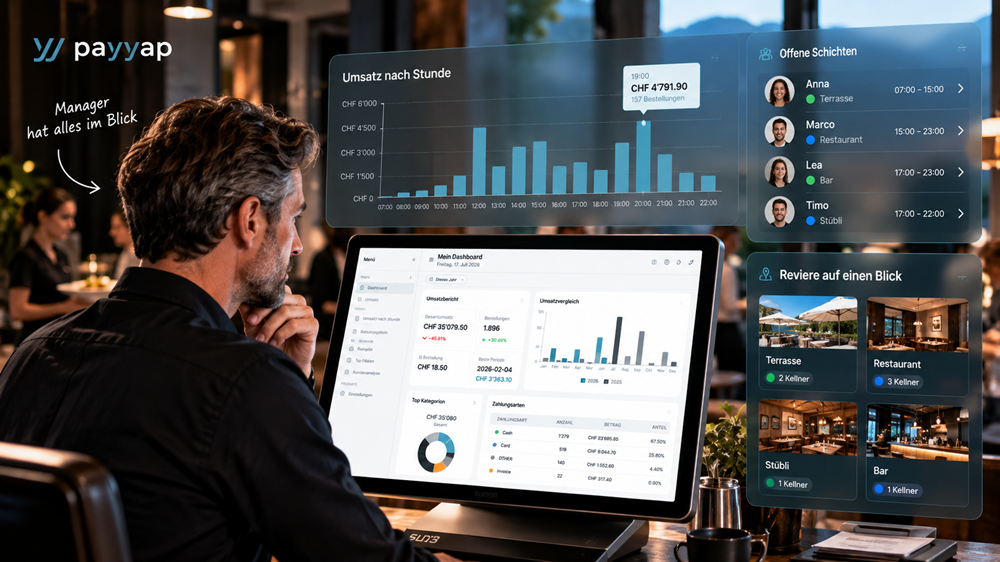
Even when multiple waiters are working simultaneously and changing shifts, the manager retains full oversight.

The manager can work in all areas and intervene as needed, regardless of section or table assignment settings. Shift handovers and soft closes are also logged and can be reviewed in the end-of-day report.

In this way, the new shift management combines flexibility for service staff with greater control for the business.
Who will benefit most from the new shift management feature?

This feature is particularly well-suited for restaurants and hospitality businesses with multiple servers and rotating shifts.

It is especially practical for businesses with:

  • multiple service areas
  • outdoor terraces and indoor dining areas
  • multiple servers per shift
  • frequent shift changes
  • stationary POS systems used by multiple staff members
  • clear assignment of tables and servers
  • a greater need for control over cash handling and shift reconciliation

‍

Ready for simpler shift changes?

With Payyap, your team stays on top of everything – from the first order to the end-of-shift report.

Häufig gestellte Fragen zum Thema

1. What is a shift in a POS system?

A shift refers to the period of time during which a server is actively working. In Payyap, the server starts their shift via their personal user profile and ends it with their own shift closure. During this time, their orders, cash receipts, and other relevant transactions are assigned to their profile.

2. What is a shift handover?

During a shift handover, a server finishes their current shift and transfers open tables and orders to another server. This ensures that service continues without interruption.

3. What does table locking mean?

With table locking, a newly opened table is assigned to the waiter who opened it. Only this waiter can subsequently serve the table and process payments. During a shift change, the table can be actively transferred to another waiter.

4. What does station assignment mean?

Station assignment restricts a server to a specific area of the restaurant. This could be the terrace, the dining room, the lounge, or the bar, for example. The server selects their station when starting their shift.

5. Can table assignment and territory assignment be used at the same time?

Yes. Both settings can be activated or deactivated independently in Payyap. If both are enabled, the waiter will only work within their defined territory and, by default, can only serve their own tables there.

6. What happens to open tables during a shift change?

If table assignment is active, open tables and orders must be actively handed over to the next server. Once the handover is complete, the new server gains access and can continue working immediately. If table assignment is not active, access to open orders is already available within the same section.

7. Does the cash register need to be closed during a shift change?

No. The waiter performs a soft close to end their own shift. The actual cash register remains open and can continue to be used by the next waiter.

8. How is a waiter's cash settled?

Each waiter manages their own cash float. At the end of a shift, Payyap calculates the expected balance based on the starting float, cash receipts, and cash payouts. The waiter counts their cash and enters the actual total. Any discrepancy is calculated automatically and must be accounted for.

9. Can a waiter transfer a table to another waiter?

Yes. During a shift change, a waiter can select another waiter to take over. The new waiter will receive the open tables and orders and can continue the service. Transfers are also possible to a waiter who already has an active shift.

10. Can a manager intervene despite table and section restrictions?

Yes. The restrictions apply to the role of waiter. Managers can take orders and process payments in all zones and are exempt from section and table restrictions.

More articles

View all articles
Trends
News
ZAGG 2026: Discover Payyap in Lucerne
Visit Payyap from October 25 to 28, 2026, at ZAGG in Messe Luzern, Hall 2 / Booth D 2125. Discover innovative solutions for the restaurant and hotel industry and secure your free trade fair ticket now.
Artikel lesen
News
Latest News
payyap Insights – The future of your business analytics
With payyap Insights, you can turn sales data into valuable insights—directly within payyap, free of charge and intuitively.
Artikel lesen
Choosing a payment provider
How much does a POS system cost in Switzerland? The comprehensive 2026 cost comparison including money-saving tips
Find out what a POS system in Switzerland really costs and how you can save money in the long run with a modern solution.
Artikel lesen
Latest News
Update News July 2026
The July update brings numerous new features, optimizations, and bug fixes to Payyap—for faster workflows, greater convenience, and an even more stable POS solution.
Artikel lesen
Choosing a payment provider
Trends
Latest News
QR code ordering system for pools – More time for swimming, less time in line
Discover how a QR code ordering system can take the pressure off your pool kiosk, reduce wait times, and improve the guest experience.
Artikel lesen
Choosing a payment provider
Trends
The Best Restaurant POS Systems in Switzerland 2026
Choosing the right POS system is crucial. Learn which features modern restaurants need and what you should look for when making your selection.
Artikel lesen
Trends
Choosing a payment provider
News
Rental Tills / Event Tills
Latest News
Restaurant ordering system: More revenue, less stress
Payyap ordering system: Scan the QR code (no extra app required), place your order via smartphone, and pay instantly!
Artikel lesen
Choosing a payment provider
Trends
The modern point-of-sale system is more than just a device
Modern POS systems combine sales and payment into a single digital solution—efficient, fast, and clear.
Artikel lesen
Rental Tills / Event Tills
Why rental units are essential today
With Payyap's event cash register, you can process payments at events quickly, cashless and without an additional terminal — simply rent and get started right away.
Artikel lesen
Trends
Rental Tills / Event Tills
Choosing a payment provider
Tap on Mobile: Checkout has never been easier
With Tap on Mobile or Tap to Pay, any Android device becomes a point-of-sale system and payment terminal for contactless payments.
Artikel lesen